

CCleaner
For over two decades, CCleaner has been the first software millions of users install on a new PC. Originally developed by Piriform and now part of the Gen Digital family (alongside Norton and Avast), it has survived OS transitions from Windows XP to the modern Windows 11 and 12.
In 2026, the question remains: With Windows having its own built-in cleaning tools, do you still need CCleaner? At Milioudis Technology And Software News, we’ve put the latest v7.05 version to the test to see if it still deserves a place on your desktop.
1. What’s New in CCleaner v7.05 (2026)?
The 2026 edition, specifically version 7.05.1241, isn’t just a minor update. It introduces a completely redesigned engine and several “smart” features that align with modern hardware.
A. AI-Driven Health Check
The classic “Health Check” has been upgraded with AI. It no longer just looks for temporary files; it analyzes how your PC’s performance correlates with installed apps. It can identify “resource-heavy” background processes that are slowing down your boot time and suggest putting them into “Hibernation” without uninstalling them.
B. Cloud Drive Cleaning
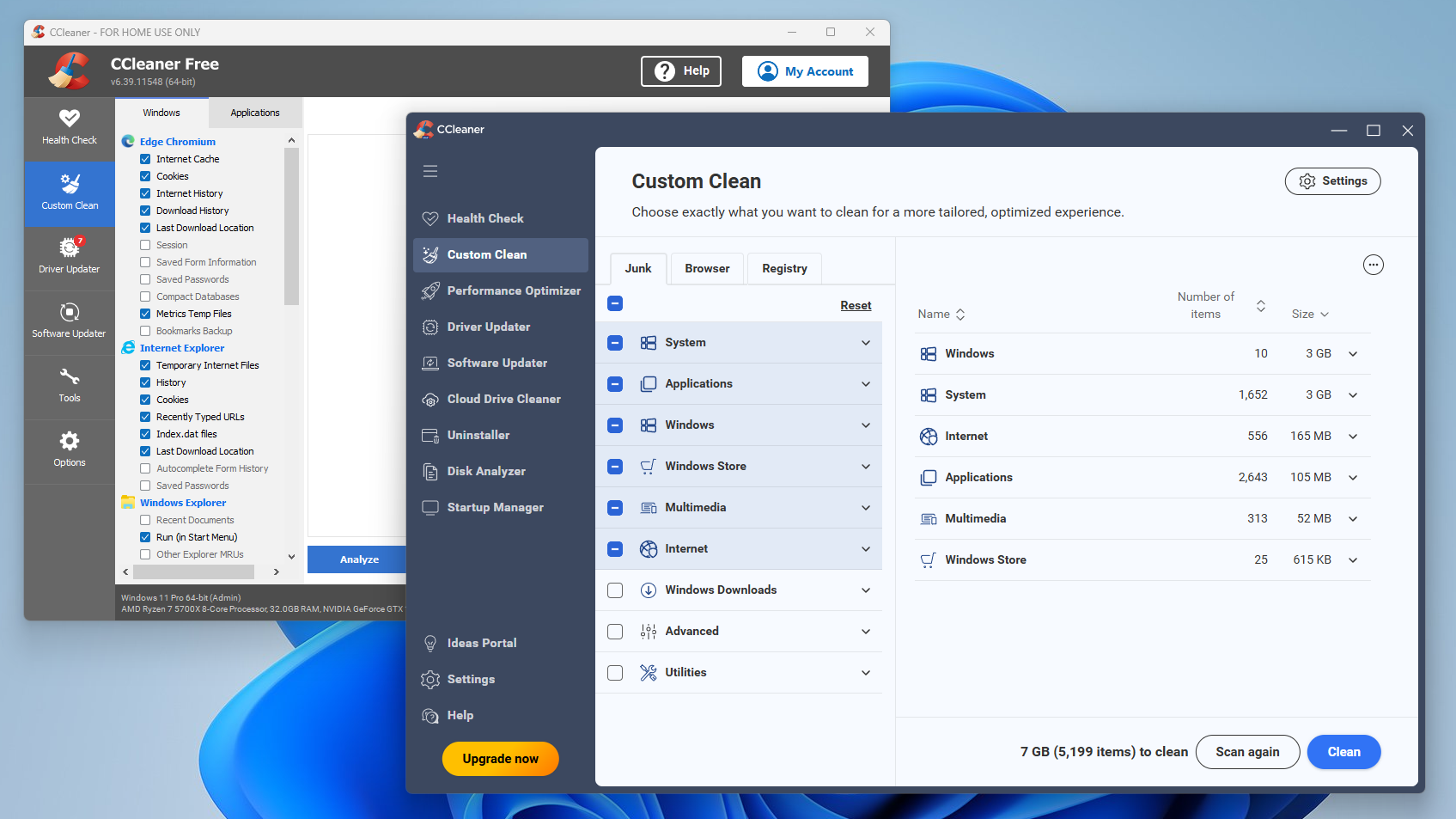
A standout feature for 2026 is the Cloud Drive Cleaner. Many users don’t realize that their Google Drive, OneDrive, or Dropbox is cluttered with duplicate files and old versions of documents. CCleaner now allows you to scan your cloud storage and remove junk, freeing up expensive cloud space without needing to download everything to your PC first.
C. Advanced Software Uninstaller
The new uninstaller engine is significantly more powerful than the standard Windows tool. When you remove a program, CCleaner performs a Deep Scan to find orphaned registry keys and hidden folders that “Add/Remove Programs” usually leaves behind. In version 7.05, it also supports Batch Uninstalling, allowing you to tick ten programs and remove them all in one go.
2. Core Features: The “Oldies but Goldies”
While the new features are exciting, the core tools are what made CCleaner famous:
- Custom Clean: Allows you to surgically choose exactly what to delete—from browser caches (Chrome, Edge, Firefox) to Windows log files.
- Registry Cleaner: Still the safest registry tool on the market. It identifies broken links and unused entries, providing a backup option before any changes are made.
- Driver Updater: Monitors over 50 million drivers to ensure your hardware (Graphics, Sound, Wi-Fi) is running on the most stable and secure versions.
3. Performance Impact: Speed and Stability
One of the major updates in 2026 is full support for ARM64 architecture. If you are using one of the new Snapdragon-powered Windows laptops, CCleaner runs natively and extremely fast.
In our testing, a “Custom Clean” on a typical year-old PC recovered approximately 4.5 GB of space and reduced boot time by 12% by disabling unnecessary startup items. More importantly, version 7.05 includes a “Safe Cleaning” protocol that prevents the accidental deletion of critical system files, a common fear among users.
4. Free vs. Professional: Which is Right for You?
CCleaner remains a “Freemium” product. Here is how the tiers break down in 2026:
| Feature | CCleaner Free | CCleaner Professional |
| Privacy Protection | Standard | Advanced |
| Health Check | Basic | Complete |
| Software Updater | No | Yes (Automatic) |
| Driver Updater | No | Yes |
| Cloud Cleaning | No | Yes |
| Support | Community | Priority 24/7 |
The Verdict: If you are a casual user who manually cleans their PC once a month, the Free version is excellent. However, if you want “Set and Forget” automation—where CCleaner cleans your browser history every time you close it and updates your drivers automatically—the Professional version (around $29.95/year) is a worthwhile investment.
5. Security and Privacy: Is CCleaner Safe in 2026?
Many veteran tech users remember the security breach CCleaner suffered years ago. Since being acquired by Gen Digital, the company has implemented Zero-Tolerance security protocols.
- No Adware: The installer is now clean and doesn’t try to force-install third-party toolbars.
- Data Privacy: CCleaner is fully GDPR compliant. In the settings, you can opt-out of all data sharing and telemetry.
- Signed Code: Every build is digitally signed and verified to ensure it hasn’t been tampered with.
6. How and Where to Download (The Official Way)
As with all software we review at milioudis.com, we cannot stress this enough: Avoid third-party mirror sites. They often bundle CCleaner with “wrappers” that include unwanted software.
The Official Download Source:
The only place you should download the software is:
Steps to Install:
- Visit the link above.
- Choose the “Free Download” button.
- During installation, click “Customize” to ensure you only install the components you want (like the desktop shortcut or context menu integration).
- Once installed, run the Smart Scan to get an immediate overview of your system’s health.
7. Pro Tips for Milioudis Technology Readers
To get the most out of CCleaner 2026, try these advanced tricks:
- Duplicate Finder: Under the “Tools” menu, use the Duplicate Finder to find identical photos or documents hidden in different folders. It’s the fastest way to save gigabytes of space.
- Browser Exclusion: If you don’t want to be logged out of your favorite websites, go to Options > Cookies and move the websites you trust to the “Cookies to Keep” list.
- Portable Version: For IT pros, CCleaner offers a Portable version (available under “Builds” on their site) that runs from a USB stick without installation.
8. The Final Verdict
In 2026, CCleaner v7.05 remains the gold standard for PC maintenance. While Windows has improved its internal tools, it still lacks the centralized control and deep-cleaning capabilities that CCleaner provides. It is fast, safe, and—most importantly—it works.
Pros:
- Unmatched at finding “hidden” junk files.
- Excellent AI-driven Health Check.
- Native support for ARM64 and the latest Windows 12 builds.
- The Free version is genuinely useful, not just a demo.
Cons:
- Professional version is now a subscription, not a one-time buy.
- Some “Performance Optimizer” alerts can feel a bit pushy for free users.