




AVG AntiVirus Free 2026: Is It Still the Best Free Protection for Your PC?
In the digital landscape of 2026, the definition of “basic security” has shifted. With the rise of sophisticated AI-driven malware, sophisticated phishing schemes, and complex ransomware, having a reliable antivirus is no longer an option—it is a necessity. Among the sea of security software, AVG AntiVirus Free remains one of the most recognized and downloaded tools globally.
But what does the free version actually offer? Is it a “complete” solution or just a demo for the paid version? In this deep dive, we explore every corner of the AVG Free ecosystem to help you decide if it’s the right shield for your digital life.
1. The Core Philosophy of AVG Free
AVG, now part of the Gen Digital family (alongside Norton and Avast), has always followed a “freemium” model. The core philosophy is simple: Provide essential protection for free while charging for convenience, privacy, and performance tools.
The 2026 edition of AVG AntiVirus Free focuses on what they call “Essential Layers.” It doesn’t just scan files; it monitors your behavior, your network, and your internet traffic in real-time.
2. Key Features: What You Get for Zero Dollars
A. The 6-Layer Security Architecture
The strength of AVG Free lies in its multi-layered approach. Even in the free version, you aren’t just getting a basic scanner. You get:
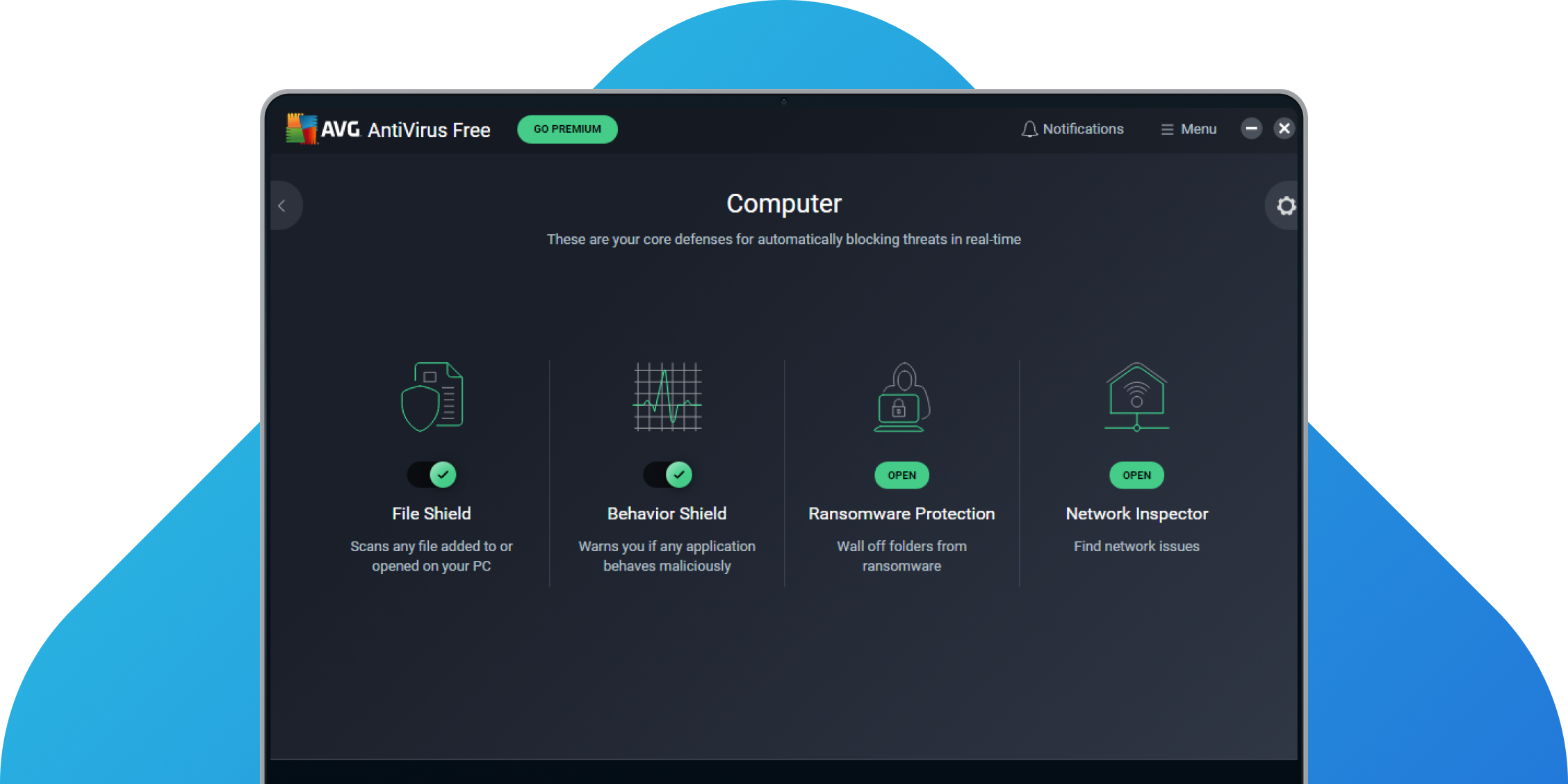
- File Shield: Scans any file added to or opened on your PC to ensure it’s not a virus.
- Behavior Shield: This is crucial for 2026. It monitors your apps for suspicious behavior that might indicate a “zero-day” threat—malware that hasn’t been identified by researchers yet.
- Ransomware Protection: It prevents unauthorized apps from changing or deleting files in your most important folders (like Documents and Photos).
- CyberCapture: If you download a file that AVG doesn’t recognize, it automatically sends a copy to the AVG Threat Labs for analysis.
- Web Shield: Blocks dangerous web links and prevents “drive-by downloads” where a virus installs itself just because you visited a compromised site.
- Email Shield: Integrates with apps like Outlook to scan incoming and outgoing attachments for hidden threats.
B. AI-Powered Detection Engine
By 2026, AVG has fully integrated its AI Cloud Intelligence. Every time a new threat is detected on any of the millions of computers running AVG worldwide, the information is uploaded to the cloud. Within minutes, every other AVG user is protected against that specific threat. This “herd immunity” is one of the biggest advantages of using a popular free antivirus.
C. Wi-Fi Inspector
Hackers often target the router rather than the PC. The Wi-Fi Inspector scans your home network for vulnerabilities, such as:
- Weak or default passwords.
- Unprotected “Smart Home” (IoT) devices that could be used as a backdoor.
- Devices connected to your network without your permission.
D. Identity Protection (Basic)
AVG now includes a basic Email Guardian. You can register your primary email address, and AVG will monitor its databases to see if your password has been leaked in a major corporate data breach. If your data is found on the “dark web,” AVG will alert you to change your password immediately.
3. Performance Impact: Does it Slow Down Your PC?
One of the oldest myths about antivirus software is that it makes your computer crawl. In 2026, this is largely a thing of the past for AVG.
The software is designed to be lightweight. During idle time, its CPU usage is negligible. During a “Full Scan,” you will notice some impact, but AVG includes a “Smart Scan” feature that only looks at the most vulnerable parts of your system, finishing in just a few minutes.
Furthermore, AVG includes a “Do Not Disturb” Mode. If you are gaming or watching a movie in full-screen, AVG will suppress all pop-ups and notifications, and delay scheduled scans until you are finished.
4. The User Interface (UI) Experience
AVG 19/2026 features a sleek, dark-themed interface that is very intuitive.
- Green Circle: Everything is protected.
- Red/Yellow Warning: Action is required. The dashboard is divided into “Basic Protection” (which is active) and “Full Protection” (which contains the locked, paid features). While some users find the “locked” icons annoying, they clearly show you exactly where the free version ends and the paid version begins.
5. What’s Missing? (The Free vs. Paid Gap)
It is important to understand what AVG Free does not do. If you need these features, you will have to upgrade to AVG Internet Security:
- Enhanced Firewall: The Free version relies on the standard Windows Firewall. The Paid version offers a custom firewall that prevents “port scanning” and remote hacking attempts.
- Webcam Protection: A must-have for privacy. It prevents apps from turning on your camera without your explicit permission.
- Fake Website Shield: Provides an extra layer of protection against “DNS Hijacking,” ensuring that when you type
bank.com, you actually go to the real bank and not a hacker’s copy. - Secure VPN: AVG Free does not include a VPN. For anonymous browsing and accessing geo-blocked content, you need the Ultimate suite.
6. Installation Guide: How to Get It Safely
To ensure you are getting the genuine software and not a malicious “clone,” always follow these steps:
- Visit the Official Site: Go to avg.com.
- Download the Installer: Click the “Free Download” button.
- Custom Setup: During installation, AVG might offer to install the AVG Secure Browser. If you don’t want a new browser, make sure to uncheck the box during the setup process.
- Initial Scan: Once installed, run your first “Smart Scan” to clean up any existing threats and establish a security baseline.
7. The Verdict: Is AVG Free Enough in 2026?
The answer is: Yes, for most users.
If you are a typical home user who browses the web, uses social media, and shops on reputable sites like Amazon, AVG AntiVirus Free provides excellent protection. Its AI-driven engine is world-class, and its ransomware protection is among the best in the free market.
However, if you handle sensitive financial data for a business, or if you are frequently targeted by hackers due to your profession, the “Premium” features like the Webcam Shield and Enhanced Firewall become vital.
Pros:
- Top-tier malware detection rates.
- Excellent ransomware protection for free.
- Minimal impact on system speed.
- Very easy to use for beginners.
Cons:
- Frequent pop-ups to upgrade to the Paid version.
- No built-in VPN.
- Webcam protection is locked behind a paywall.
Final Thoughts
AVG AntiVirus Free 2026 proves that you don’t always have to pay for high-quality security. It is a powerful, reliable, and modern tool that handles the “heavy lifting” of PC security automatically. As long as you can ignore the occasional advertisement for the Pro version, it remains one of the best ways to keep your Windows PC safe in an increasingly dangerous digital world.