In the digital era, video files come in hundreds of different formats, sizes, and codecs. Whether you are trying to make a 4K movie fit on your smartphone, converting an old family DVD to a digital file, or optimizing a video for YouTube, you need a reliable tool. For over 20 years, that tool has been HandBrake.
As of March 2026, the HandBrake team has released Version 1.11.0, a landmark update that fully embraces AI-assisted encoding and next-gen hardware acceleration. At Milioudis Technology And Software News, we’ve put this new version to the test. In this 1500-word deep dive, we explore why HandBrake remains the undisputed king of video transcoding and how you can master its 2026 features.
1. What is HandBrake?
HandBrake is a free, open-source, and multi-platform video transcoder. Its primary purpose is to take a video you already have and create a new one that is compatible with your specific device (iPhone, Android, PlayStation, TV, etc.).
What makes HandBrake special is its transparency. Unlike many “free” converters found online, HandBrake contains no ads, no hidden trackers, and no “pro” version. Everything it offers is available to everyone, completely free, forever.
2. What’s New in HandBrake 1.11.0 (2026 Release)?
The 2026 version is built for the modern hardware of today. If you are using an NVIDIA RTX 50-series, an AMD Radeon 8000, or an Apple M5 chip, this version of HandBrake will feel like a rocket ship.
A. Full AV1 Ecosystem Support
In 2026, the AV1 codec has become the industry standard, offering better quality than HEVC (H.265) at much smaller file sizes. HandBrake 1.11.0 now features:
- SVT-AV1 (Software): Improved multi-core scaling for ultra-high-quality encodes.
- NVENC/VCE/QuickSync AV1 (Hardware): If your GPU supports AV1 hardware encoding, HandBrake can now transcode a 4K movie in minutes rather than hours.
B. AI-Powered De-Interlacing and Noise Reduction
HandBrake has integrated AI filters that can intelligently identify noise and “interlacing” artifacts in old videos. The new “Smart Denoiser” preserves facial details while removing the grainy “snow” often found in low-light footage or old analog tapes.
C. HDR10+ and Dolby Vision Passthrough
For the home cinema enthusiasts at milioudis.com, HandBrake 2026 now fully supports the passthrough of Dynamic Metadata. This means you can compress a high-end Blu-ray rip while keeping the HDR10+ or Dolby Vision information intact, ensuring your colors look perfect on a high-end OLED TV.
3. The Core Interface: A Guided Tour
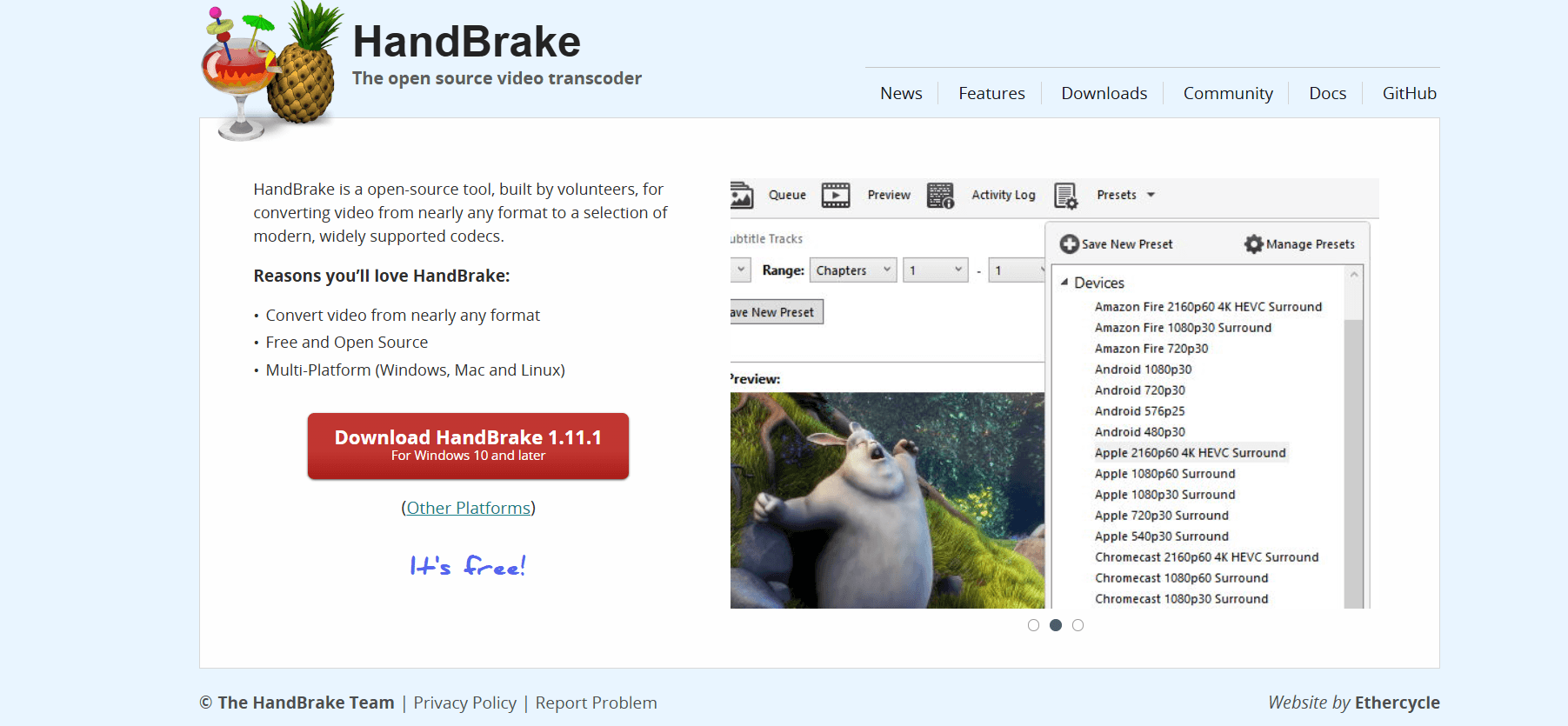
HandBrake’s interface can look intimidating at first, but it is logically organized into several tabs:
- Source Selection: Drag and drop any video file or a whole folder. HandBrake can even read DVD and Blu-ray structures (though it does not bypass copy protection on its own).
- Presets: On the right side, you’ll find a library of pre-made settings for almost every device. In 2026, new presets for Apple Vision Pro, Meta Quest 4, and Discord (Optimized) have been added.
- Dimensions: Here you can crop black bars automatically or manually resize your video.
- Video Tab: The heart of the program. This is where you choose your codec (H.264, H.265, AV1) and your Constant Quality (RF).
- Audio Tab: You can keep multiple audio tracks (e.g., English and Greek) or downmix a 5.1 surround track to Stereo to save space.
- Subtitles: HandBrake allows you to “burn in” subtitles into the video or “soft-code” them so you can turn them on/off in your player.
4. Why Use HandBrake in 2026?
With so many “fast” converters available, why choose HandBrake?
- Bitrate Efficiency: HandBrake’s x265 and AV1 implementations are significantly more efficient than those found in simple web-based converters. You get better quality at 50% less file size.
- Batch Processing: You can add 100 videos to the Queue and let your computer work overnight.
- VFR Support: It handles Variable Frame Rate footage (often produced by smartphones) perfectly, ensuring your audio and video stay in sync—a common problem in other converters.
- No Limits: There are no file size limits, no “watermarks,” and no duration caps.
5. System Requirements for 2026
While HandBrake can run on old machines, the new 2026 features (especially AV1) benefit greatly from modern hardware:
- Processor: Intel Core i5/i7/i9 (12th Gen+) or AMD Ryzen 5000+.
- Memory: 8GB RAM for 1080p, 16GB-32GB for 4K.
- Graphics: An AV1-capable GPU (RTX 40/50 series, Intel Arc, or Radeon 7000+) will drastically reduce encoding times.
- Software: Windows 10/11/12 (64-bit), macOS 13+, or any modern Linux distribution (Flatpak/Ubuntu/Fedora).
6. How and Where to Download (Official Source)
Because HandBrake is so popular, there are many “fake” websites that try to sell it or bundle it with malware. Never download HandBrake from anywhere other than the official site.
The Only Official Download Source:
Official Site:www.handbrake.fr
Installation Steps:
- Go to the Downloads page.
- Select your operating system. For Windows users, the .exe installer is the easiest choice.
- Note for Windows Users: HandBrake may require the Microsoft .NET Desktop Runtime 8 or 9. The installer will provide a link to download it safely from Microsoft if you don’t have it.
- Once installed, simply launch the app and you are ready to transcode.
7. Pro Tips for Milioudis Technology Readers
To get the most out of HandBrake 1.11.0, use these “Pro” strategies:
- The RF (Quality) Rule: For H.265 or AV1, an RF of 20-22 is usually “visually transparent” for 1080p. For 4K, you can go to RF 24-26 to save massive amounts of space without losing detail.
- Hardware vs. Software: Use “NVENC” or “QuickSync” if you are in a hurry. Use “x264/x265” (Software) if you want the absolute smallest file size possible at the highest quality.
- Check the Preview: Always use the “Preview” button to encode a 30-second clip before starting a 2-hour job. This ensures your subtitles and aspect ratio are correct.
- Save Your Own Presets: If you find a setting that works perfectly for your phone, click “Add” in the Presets menu so you don’t have to set it up again next time.
8. Final Verdict
HandBrake 2026 remains the gold standard for video conversion. While it doesn’t have the flashy “one-button” interface of some paid competitors, its power, reliability, and respect for user privacy make it unbeatable. Whether you are a pro videographer or someone just trying to save space on their hard drive, HandBrake is an essential tool for your digital arsenal.
Pros:
- Completely free and open-source.
- Industry-leading AV1 and HEVC encoding.
- No ads, watermarks, or tracking.
- Professional-grade control over every setting.
Cons:
- Higher learning curve for beginners.
- Does not include built-in DVD/Blu-ray decryption (requires external tools like MakeMKV).